Built for AMI shops. Runs beside AMI.
Every panel, every station, every minute.
AMI runs your orders. VDS is the floor companion that runs next to it. Operators scan the barcode AMI already prints, and VDS turns those scans into live pace, scores and answers, right where the work is done.
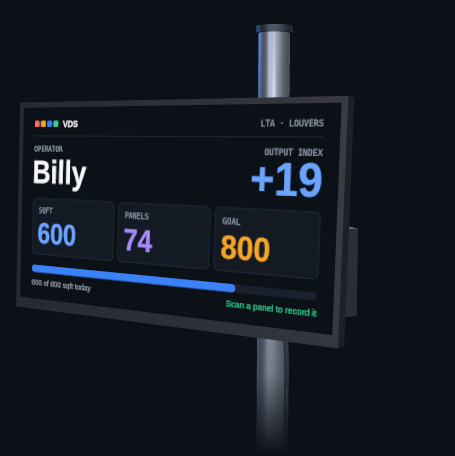
Every operator's kiosk is a purpose-built machine. It boots straight to the VDS start screen, and it wakes and sleeps on a schedule that follows your shifts.
- No login
- No software install
- No updates
- No keyboard or mouse
- Near 100% uptime with no maintenance
Take AMI Paperless
The work instructions move from the paper to the operator's screen
The details AMI prints on paper today appear on the kiosk instead. One scan brings up simple, exact instructions for that operator and that job, and nothing else.
- Each operator sees only their own step, not the whole order
- The numbers come straight from the AMI order, so nothing is retyped
- Large type that can be read from the machine
- In English and Spanish
Cut 30 louvers
Performance
Know who is ahead and who is behind, live
The Output Index compares square feet scanned against the day's goal, minute by minute, and skips breaks. Ahead and behind are color-coded, so it reads at a glance.
- By plant, line, department, station or operator
- Panels, square feet, average panel size and time per square foot
- Shown on the kiosk, the tablet and the wall display
SOPs
Write each job down once and answer it at the station
Procedures, product knowledge and spec sheets live in one library. Operators ask at the station and get the answer from your own documents, with the page cited.
- One glossary, so each term has one Spanish translation
- Safety, dimension and machine-setting questions are never answered without a source
- Questions nobody could answer become a list of procedures to write
Ask VDS
Ask the plant a question in plain English
Type a question and get an answer drawn from your floor data in VDS, your orders in AMI and your own documents. Every answer shows where it came from. If it cannot verify something, it says so.
- Runs on the PC in your building, with no cloud service
- Answers in English and Spanish
- Can send a daily summary by email on a schedule
Maintenance
Keep every machine on a real schedule
Each machine has its own tasks, intervals and part numbers. Overdue tasks turn red. Completing one logs it and sets the next date.
- Reminders appear on the kiosk where the machine is
- The schedule and history stay in the portal for the owner
Messages with photos
The floor talks to the manager's tablet, and the tablet talks back
Every floor manager carries a tablet. When something needs attention, it arrives there as an alert, with the order, the station and the person attached. The manager can answer from wherever they are standing.
- Manager calls. An operator taps the kiosk to call a manager. The tablet shows who called and from which station.
- Quality issues with photos. Take a photo of the problem on the tablet and post it. VDS shows who touched that panel and where.
- Hot orders. Flag an order once. Every kiosk that order touches tells the operator, in English and Spanish.
- Slow panels. The tablet warns when a panel has sat at one station too long.
- Notes and announcements. Send a note to one station or an announcement to the whole floor.
Panel analytics
See what the plant is actually building
Every scan carries the panel's details, so the mix adds up on its own: tilt type, finish, panel type, sill and more, for any date range.
- Totals for panels, square feet and operators
- Paint against stain, rectangle against specialty
- Plant output against target for the same period
The screenshots are real screens from a 50-person shutter plant where VDS runs beside AMI every shift, with names hidden. Where a picture is an illustration, its caption says so. Click any screenshot to enlarge it. Open the VDS Simulation to click through it with sample data.
Beside AMI
AMI runs the order. VDS watches the floor.
The two systems run side by side. AMI stays exactly as it is, and VDS uses the orders and barcodes AMI already produces. VDS never sits on top of AMI and never changes it.
Your order system
AMI
The backbone of the shop, unchanged.
- Ordering
- Programming
- The cart system
- Assembly
- Accounting
- Shipping
Your floor system
VDS
Runs next to AMI, on its own PC.
- Panel scans
- Operator pace
- Flags and instructions
- Training
- Maintenance
- Plant questions
- Read-onlyVDS reads order data from AMI and never writes anything back.
- Nothing installedNo software is added to any AMI computer.
- Same paperworkOperators scan the barcode AMI prints today.
- Stays in the plantYour data lives on a PC you own, inside your building.
How it works
One scan at each station does the work.
Nothing changes about how orders are entered in AMI or how paperwork prints. VDS adds a kiosk at each station and does the counting for you.
AMI prints the barcode
The same barcode that is on your paperwork today. No new labels and no extra printing.
The operator scans it
The first scan of the day clocks the operator in. Each scan after that records a panel arriving at that station.
The numbers appear
Pace against goal, panels and square feet, flags and special instructions show up right away, in English and Spanish.
Where the numbers show up
Four places, one set of numbers.
Station kiosk
A small screen and scanner on a post. Shows the operator their pace, flags and instructions at the moment of the scan.
Manager tablet
Hot orders, notes, announcements, quality issues with photos, and the frame and component library.
Wall displays
Office and break-room screens with line flow, top departments and output against goal.
Owner portal
Goals, shifts, people, reports, knowledge and maintenance in one place, plus a daily report by email.
Install and support
We bring it, set it up and stay with you.
VDS is installed on site by the people who built it and run it every day in a shutter plant.
Hardware included
The plant PC, a kiosk and scanner for each station, manager tablets and display screens arrive ready to run.
Set up on your floor
We install on site, match VDS to your lines, departments and stations, and connect it to AMI with a read-only login. Your AMI setup is not changed.
Training for your people
Operators learn the scan in minutes. Managers and owners are walked through the tablet and the portal.
Ongoing support
One point of contact for questions, changes and updates after the install.
Pricing
Priced by the plant and the station.
Hardware is a one-time cost. The ongoing fee is collected the same way as your AMI fee, so there is one bill to manage.
Plant server
$2,000One time. The PC that runs VDS for the whole plant.
Each station
$300 per stationOne time. The kiosk for one work station.
On-site install
QuotedTravel, setup on your floor and training, quoted for your plant.
Ongoing
__% of revenueCollected by AMI alongside your AMI fee.
Example: a plant with 12 stations is $2,000 for the server plus 12 × $300 for the stations, which comes to $5,600 in hardware before install.
See it running
Want to see VDS on a live floor?
Ask your AMI contact for a walkthrough, on a call or at a kiosk, using real production from that day.